Windows XP Vienna Edition
| Crusty Windows bootleg | |
 The desktop of Windows XP Vienna Edition | |
| Original OS | Windows XP SP3 |
|---|---|
| Release date | August 18, 2008 |
| Author | haiter |
| Country | Vietnam |
| Language(s) | English |
| Architecture(s) | x86 (32-bit) |
| File size | 693.4 MiB |
| Download link | Windows XP Vienna Edition.iso |
| Date added | August 9, 2022 or before |
Windows XP Vienna Edition is a bootleg Windows XP SP3 edition, which was created by haiter. It released on August 18, 2008, and was added to the archive on August 9, 2022, or before. It is popular due to it being featured twice on Michael MJD's channel. (https://www.youtube.com/watch?v=y74Dfwh8ZgM and https://www.youtube.com/watch?v=jn2osXI4vr4)
Description
Vienna Edition, as with many other modifications of XP from around this time, has Aero interface elements. It comes with another interface known as the Vienna Dock which allows users to open programs without the Start menu
Changes from Windows XP SP3
Minor changes
- The General page in sysdm.cpl has been completely redesigned.
- The taskbar is now transparent.
Look and feel
- Several icons have been changed to Vista icons.
- This mod comes with several new themes.
- The sounds have been changed to the Samsung Theme sounds.
Software
- CoreTemp 0.96
- FileMenu Tools 5.2
- HWMonitor 1.06
- Resource Hacker 3.4.0.79
- UltraExplorer 1.5.0.3
Customization Utilities
- RocketDock 1.3.5
- RUN ME 0.8.5
- ThumbWin 1.2.8
- TopDesk 1.5.3
- TrueTransparency
- UberIcon 1.0.2 Build 38
- Vienna Navigator 7.1
- VisualTaskTips 2.3.0.0
- Windows Seven Dock 0.1.0.0
- Y'z Shadow 1.9
Gallery
-

Setup in the graphical phase
-

Boot screen
-
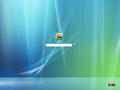
Login screen
-
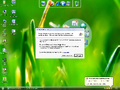
First boot desktop
-
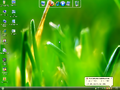
Desktop
-
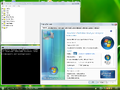
Demo


